Alternatives
Canva Alternatives for Instagram Carousels: 6 Tools Compared
Trender · Updated
The best Canva alternative for Instagram carousels, if you do not want to design, is Trender. It suits creators, coaches, marketers and small-business owners who have an idea or a text and want slides without doing the layout. You start from the idea or your own words, and Trender writes or splits the text into slides and sets them in a ready-made design. It runs in the browser and on iPhone, and the free plan includes three generations with no credit card.
Canva is still the right tool if you want hands-on control of every element, or if your team already designs there. The table shows what each tool covers.
| Tool | Writes the slides for you | Keeps your own text as written | Ready-made designs | Places your photos for you | Starts from a Reel link | iPhone app |
|---|---|---|---|---|---|---|
| Trender | ✓ | ✓ | ✓ | ✓ (iPhone app) | ✓ | ✓ |
| Contentdrips | ✓ | ✓ | ✓ | ✓ | ✓ | — |
| PostNitro | ✓ | ✓ | ✓ | — | — | — |
| aiCarousels | ✓ | ✓ | ✓ | — | — | — |
| Supaslides | ✓ | — | ✓ | ✓ | — | — |
| Carousel Studio | ✓ | — | ✓ | — | — | — |
| Canva (for reference) | ✓ | ✓ | ✓ | ✓ | — | ✓ |
Trender covers all six columns. Contentdrips and Canva cover five. PostNitro, aiCarousels and Supaslides cover three, and Carousel Studio covers two.
| Tool | You start from | Free option | Entry price |
|---|---|---|---|
| Trender | An idea, your own text, an Instagram Reel or TikTok link, or a trending post | Free plan: three generations, no credit card | Content plan $12.99 per month or $39.99 per year. See Trender plans |
| Contentdrips | A topic, blog, website or video | Free text-to-carousel tool. 7-day free trial of the paid plans, no credit card | Starter $19 per month |
| PostNitro | A topic, article URL, your text or an X post | Free plan, no credit card: up to 5 slides per carousel and 5 watermarked downloads a month | Starter $15 per month |
| aiCarousels | An idea, link, PDF or YouTube video | One free carousel to edit, not to download | Pro $15 per month, or $120 billed yearly |
| Supaslides | Your website, a one-line brief, a URL or notes | Free plan: 3 carousels a month, watermarked export | Pro $19 per month |
| Carousel Studio | A typed prompt | 20 free credits at signup. 3-day free trial of Pro | Pro $10 per month, $120 billed annually |
| Canva (for reference) | A carousel template, a blank carousel or a short description | Free plan, US$0 | Pro US$18 per month, billed monthly |
Why a carousel takes long in a design tool
Canva's carousel page gives you two ways in. You can create a blank carousel Instagram post, or you can pick a template and edit, download and share it. Canva AI can also suggest a starting design from a short description.
Either way, the layout is yours to arrange, and so is most of the copy. You decide where each slide ends, fit each paragraph into the frame and place each photo.
That suits work where the design is the point. It is slow when you already know what you want to say. The tools below start from the words instead.
Trender: best when you want finished slides from an idea or a text
What it is: Trender is an AI content workshop for Instagram creators and marketers that writes carousels from an idea or lays out your own text in a ready-made design.
Best for: a creator, coach, marketer or small-business owner who has something to say, does not want to make layout choices and does not want to start from a long list of options.
What you start from: an idea or your own text. You can also start from an Instagram Reel or TikTok link in the Workshop on the web, or from a post in the Trends feed.
How it works in the iPhone app, with your own text:
- On the home screen, tap the "Carousel" card ("Turn an idea into designed slides"). It opens "Create a carousel" with three steps across the top: "Text", "Photos" and "Design".
- Under "Add text or an idea." tap the field that reads "Paste a post, a note or a story…" and paste. Leave "Design my text" selected, then tap "Next: photos".
- On "Add your photos" pick images from your library, or tap "Continue without photos".
- On "Choose your design" tap a card, tap "Try my text" to see a preview built from your own content, then tap "Open editor".
- In the editor tap "Export", then "Download all slides".
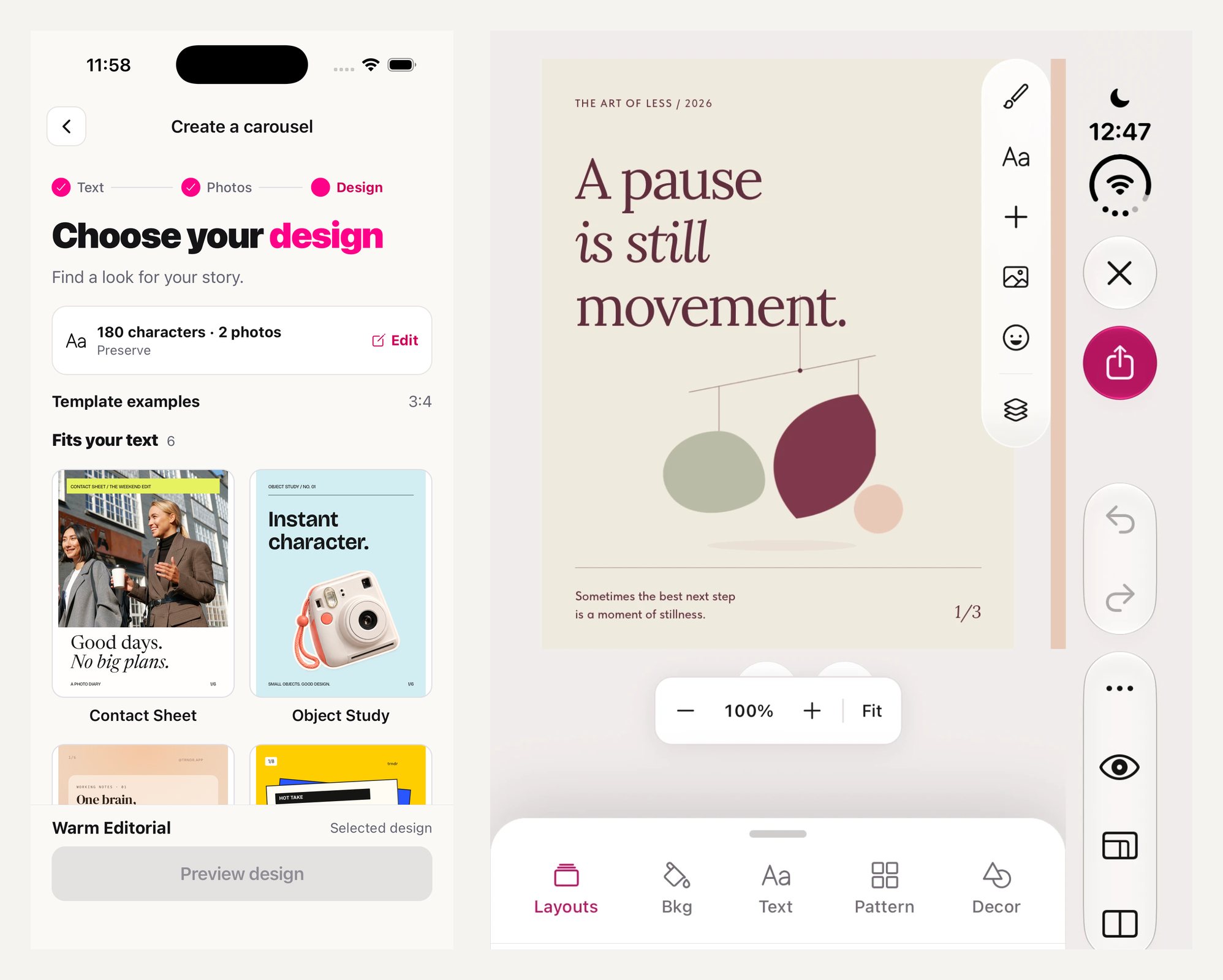
With "Design my text" every word stays. Trender splits the text into slides whether you pasted three lines or three pages, and it places your photos on the slides. The app has dozens of ready-made designs, and they are sorted by how much text you have. The filter chips are "Long reads", "Lists", "Short thoughts", "Photo stories", "Photo + text" and "Animated".
On the web: open the Workshop at trndr.app, type your idea and click "Generate content", or paste your own text. Then click "Create a designed carousel" to lay the text out as written. A generation writes 3 to 10 slides and a Reels script from the same idea. Placing your photos is part of the iPhone app.
Where it runs: in the browser and in the Trender AI app for iPhone.
Price: the free plan gives three generations with no credit card. In the app, saving slides to your Photos library is part of PRO. On the web, the Content plan is $12.99 a month or $39.99 a year. See Trender plans.
Contentdrips: best for turning a blog or video into branded posts
Best for: a team that repurposes blogs or videos and wants its brand applied automatically.
What you start from: a topic, blog, website or video pasted into Contentdrips.
What it does: you save your colors, gradients, fonts and logo once. You can upload pictures and the best match is picked for each post. A free text-to-carousel tool splits your own text into slides.
Price: a 7-day free trial of the paid plans with no credit card. Then Starter is $19 a month on the pricing page.
PostNitro: best for generated slides plus scheduling
Best for: a marketer who wants generated slides, a brand kit and a scheduler in one product.
What you start from: a topic, an article URL, text you already wrote or a post from X. You choose the number of slides and PostNitro writes and designs them.
What it does: it has 100+ editable templates and a brand kit and exports PNG, PDF or MP4. Publishing and scheduling to six channels start at the Creator+ plan.
Price: the free plan needs no credit card and allows up to 5 slides per carousel and 5 watermarked downloads a month. On the pricing page, Starter is $15 a month and Creator+ is $30 a month.
aiCarousels: best for trying an idea before you sign up
Best for: someone who wants a generated carousel before making an account.
What you start from: an idea, with no sign-up needed to start. On aiCarousels an AI ghostwriter writes every slide. Pro adds sources such as a link, a PDF or a YouTube video.
What it does: it offers 95 themes and 304 layouts, brand kits, PDF and PNG downloads and posting to LinkedIn. You can choose "My exact words" to keep your own lines.
Price: the free try is one carousel that you can edit but not download. On the pricing page, Pro is $15 a month, or $120 billed yearly.
Supaslides: best for founders who want slides built from their site
Best for: a small product team that wants carousels built from its website.
What you start from: your website, which Supaslides reads for your colors, fonts and voice. You can also start from a one-line brief, a URL to repurpose or your own notes.
What it does: it offers 40+ styles and drops your photos onto the slides. Exports include PNG decks, animated video and a PDF for LinkedIn.
Price: the free plan allows 3 carousels a month with watermarked export. Pro is $19 a month for 20 carousels a month.
Carousel Studio: best for staying inside Canva with a prompt
Best for: a Canva user who wants a first draft from a prompt without leaving the design.
What you start from: a typed prompt. You type what you want to say and Carousel Studio returns a structured, multi-slide carousel. It works as a Canva app.
What it does: every slide stays editable, and you can post straight to Instagram.
Price: 20 free credits at signup and a 3-day free trial of Pro. On the pricing page, Pro is $10 a month ($120 billed annually) with 500 credits a month.
When to stay with Canva
Stay with Canva if you want hands-on control of every element. Stay if your team already designs there. Canva also has an iPhone app, and its pricing page lists Free at US$0 a month for one person and Pro at US$18 a month when billed monthly.
If you like Canva's layouts but not writing the slide copy, you can write the copy in Trender first and lay it into a Canva template. Here is how that handoff works.
How to choose by what you want to stop doing
- You want to stop writing the copy: Trender writes the slides from an idea. The other five also write from an idea or a brief.
- You want to stop laying out text: paste your words into Trender and choose "Design my text" in the iPhone app. PostNitro, aiCarousels and Contentdrips also work from your own text.
- You want to stop placing photos: Trender, Contentdrips and Supaslides place your pictures on the slides. In Trender this happens in the iPhone app.
- You want to start from a video: Trender takes a Reel or TikTok link in the web Workshop. Contentdrips also takes video.
- You want to stop scheduling by hand: PostNitro publishes and schedules to six channels from the Creator+ plan.
- You want to keep control of every element: stay with Canva.
Common questions
Is there something easier than Canva for Instagram carousels?
Trender, if the hard part for you is the layout and the words. You paste an idea or your own text, and it builds the slides in a ready-made design. The iPhone app sorts designs by how much text you have.
Which Canva alternative writes the slides for me?
All six do. Trender writes the slides from an idea, and the other five write from a topic, an idea or a brief. Trender also writes a Reels script from the same idea, and it keeps your own text word for word when you choose "Design my text".
Is there a free Canva alternative for carousels?
Trender has a free plan with three generations and no credit card. PostNitro has a free plan, Supaslides allows 3 watermarked carousels a month, and Contentdrips has a free text-to-carousel tool. aiCarousels gives one carousel to edit but not download, and Carousel Studio gives 20 credits at signup.
Can I use Trender and Canva together?
Yes. You can write the slide copy in Trender and then lay it into a Canva template. The connection guide shows how.
Do I need design skills to make a carousel in Trender?
No. Trender splits your text into slides, offers ready-made designs and places your photos, so you choose a look instead of building one. Photos are optional.
For a wider comparison read our guide to seven AI carousel makers, and for the full app walkthrough see how to turn text into an Instagram carousel.