Content research
Instagram Competitor Analysis: A Content Research Template
Trender · Updated
Instagram competitor analysis is the process of comparing relevant accounts to understand their topics, formats, hooks, and visible performance. To turn that research into content ideas, record what each post does, identify a recurring pattern, and write an original brief for your audience.
What you’ll leave with
A research worksheet, a filled comparison, and three content briefs.
Download the research worksheet ↓1. Choose competitors around one audience question
Imagine you manage Instagram for a freelance web designer. Your next posts need to help small-business owners understand what makes a useful homepage. Your research question is: how do other accounts explain a design decision without overwhelming a client?
Start with a small working set, such as three to five accounts. Include direct competitors serving similar clients and adjacent educators who explain the same problem well. A large design-entertainment account may have impressive views but a very different audience.
Use a consistent observation window, such as the previous month. Write down the date you collect the data. Review several posts per account, including ordinary performers, so one exceptional Reel does not become your entire strategy. These are practical starting points, not statistical sampling rules.
2. Record the hook, structure, and evidence
Use one row per post. Separate the evidence you can observe from your interpretation of why the content might be useful. A spreadsheet works; the downloadable CSV below supplies the fields.
Compare similar formats and posts of similar age within an account before comparing raw numbers across accounts. Public likes, comments, or views can guide further investigation. They do not reveal a competitor’s private saves, reach, watch time, or sales.
| Field | Record this | Use it to decide |
|---|---|---|
| Source and dates | Post URL, account, post date, collection date | Can you revisit and compare the example? |
| Audience and topic | The specific question the post answers | Does it match a question your customers ask? |
| Hook and first visual | Opening words and what appears on screen | What expectation does the opening create? |
| Structure and format | Comparison, demonstration, checklist, story; Reel or carousel | What could you adapt with your own evidence? |
| Visible performance | Available public metrics; unknown fields left blank | Which posts deserve a closer look? |
| Your brief | Your angle, example, format, and next step | What will you actually create? |
3. Turn three observations into three original ideas
The following is a fictional teaching example for a web designer. It illustrates how to analyze creative structure; it is not a report about real accounts or their performance.
- Reel brief: show “Beautiful websites for everyone” beside “Portfolio websites for wedding photographers.” Explain what becomes clearer when the audience is named.
- Carousel brief: create a sample homepage and annotate the headline, supporting sentence, and next action. Use one annotation per slide.
- Question-led brief: explain what a client should gather before writing website copy: customer questions, offer details, and examples of their work.
| Reference structure | Useful pattern | Your original idea |
|---|---|---|
| A Reel compares two versions of a page | Show the choice before explaining it | Compare a vague headline with one that names a customer. |
| A carousel marks up a crowded layout | Give the reader one decision per slide | Explain what belongs above the fold using your own sample homepage. |
| A founder answers a common objection | Start with the question buyers hesitate to ask | Answer “Can I write the website copy myself?” with a preparation checklist. |
4. Take one idea all the way to a script
A brief should let someone make the post without guessing what the research meant. Name the audience, the point, the evidence, and the action. Here is the first idea from the comparison turned into a recordable draft.
5. Run the research workflow in Trender
Trender’s knowledge base describes a practical sequence: track relevant accounts, review their posts, inspect the AI analysis, and save references for planning. Use the analysis as a first pass, then watch the source content to check it.
In the tracked-account post view, use the available time and sorting filters to narrow the reference set. Open a post to inspect its hook, structure, and transcript where available. Save useful references to Ideas; group the work by client or project.
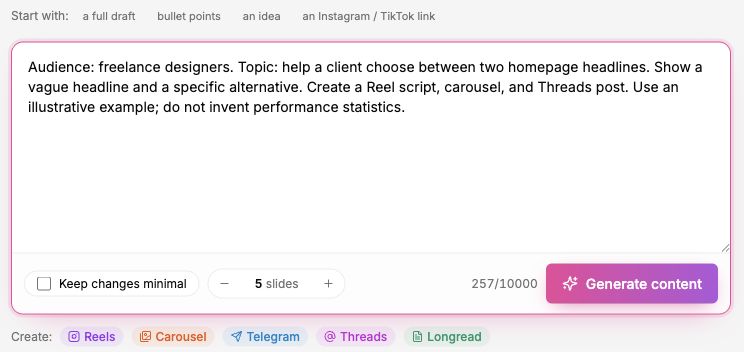
Once you have a point of your own, move to Workshop. You can start with text or an Instagram/TikTok link. For this teaching example, the input below asks for a comparison about homepage copy.
6. Review the experiment, not just the views
Before publishing, choose what the post should achieve. For the designer, that might be relevant questions about homepage copy or visits to a service page. Keep views as context and record the same observation period for each post.
At your next review, compare the brief with the response. Did the audience ask the question you intended to answer? Was the example easy to understand? Keep useful patterns and refine the next execution. Different posts change several variables at once, so avoid attributing every difference to the hook.
Common questions about Instagram competitor analysis
How many competitors should I track? Start with a set small enough to review carefully. Three to five relevant accounts is a workable first exercise; expand only when another account adds a distinct audience, format, or angle.
Can I do this without a paid tool? Yes. You can review public posts and use the worksheet. A tool can bring references and analysis into one workflow, but the important output is still your next content decision.
How often should I repeat it? Match the review to your planning cycle. A weekly idea review and a broader monthly comparison can be a useful starting routine.