Cross-platform content
How to Repurpose Content Into a Reel, Carousel, and Thread
Trender · Updated
To repurpose content, preserve the useful idea while rebuilding its delivery for each format. Write a short source brief, turn the demonstration into a Reel, split the explanation into carousel slides, and develop the reasoning as a thread. Review each version as a standalone post.
What you’ll leave with
A complete Reel script, six carousel slides, four thread posts, and a reusable brief.
Download the source brief and example drafts ↓What changes when you repurpose content?
Reposting repeats a piece of content. Crossposting shares it on another platform with little or no change. Repurposing changes the format or presentation while keeping the central idea. For example, a written explanation can become a screen-recorded demonstration or a sequence of slides.
The practical question is what the reader needs in each version. A Reel needs a spoken and visual sequence. A carousel needs a readable progression. A thread needs an opening post that makes sense before someone reads the replies.
Start with one specific source brief
Use a customer question, a paragraph from your own article, a work note, or an idea you can explain with an example. Refresh any outdated details before adapting it.
Our original teaching example is a web designer explaining homepage copy to small-business clients. The sample headlines and finished drafts below are editorial examples, not a customer case study.
Version 1: the complete Reel script
Use the comparison as the first frame. The viewer can inspect the difference while you explain it. Keep the sample headlines large enough to read on a phone.
Version 2: a six-slide carousel with finished copy
The carousel breaks the same decision into steps. These cards contain the actual slide copy, so you can adapt them directly. They are a teaching layout, not screenshots of generated Trender output.
01 · Slide 1 · Cover
Your homepage headline sounds good. But who is it for?
A simple way to make a broad headline more specific.
02 · Slide 2 · Starting point
“Beautiful websites for everyone.”
It describes a positive outcome, but leaves the service and customer open to interpretation.
03 · Slide 3 · Name the service
What do you actually build?
For this example: portfolio websites. Start with a phrase a potential customer would recognize.
04 · Slide 4 · Name the customer
Who needs that service?
For this example: wedding photographers. Choose the audience your offer actually serves.
05 · Slide 5 · Put them together
“Portfolio websites for wedding photographers.”
The new line names both the service and the customer. The rest of the page still needs to explain the offer.
06 · Slide 6 · Try it
I create [service] for [customer].
Use this as a first draft. Then ask someone what they think you offer.
Version 3: four connected Threads posts
Let the first post carry a useful thought by itself. The remaining posts add the example and method. This version preserves the designer’s point without depending on the carousel.
What stayed the same, and what changed?
The audience, example, and recommendation stay consistent. The opening and sequence change to suit how each piece is consumed. This is the check to make when an AI draft starts drifting away from your source.
| Format | Keep | Adapt |
|---|---|---|
| Reel | The two headlines and the service/customer lesson | Spoken explanation, shot sequence, readable first frame |
| Carousel | The same starting headline and revision | One step per slide, a cover, and a final prompt |
| Thread | The same example and qualified claim | Standalone opening, connected reasoning, written next step |
Create your own versions in Trender Workshop
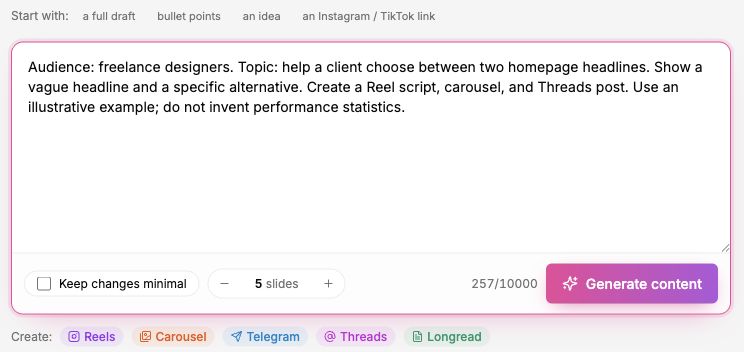
Trender’s Workshop guide describes three starting points: your own text or idea, an Instagram/TikTok link, or a video sent from Trends using Repurpose in Workshop. For a first exercise, paste a specific brief such as the one below.
Repurpose supports Reels scripts, carousel copy, Telegram posts, Threads posts, and long-form text. Choose the formats your audience uses. If you work from a reference, add your own subject and evidence so the draft develops your message.
The interface lets you choose the carousel slide count. After generating, review and edit each draft. The carousel workflow also offers a design editor. Preparing these drafts is separate from scheduling or publishing them.
Review each version before publishing
Read each version without looking at the others. Is the question clear? Is the example present? Does the next step fit the format? Remove phrases such as “watch below” from a carousel and explain visual references in a text-only post.
Publish through your usual workflow, then record results by format. Choose a meaningful goal, such as relevant replies or visits to a service page. Keep the source brief with your drafts so the next review connects the original idea to what you published.
Content repurposing questions
Do I need a long article to start? No. One useful explanation with a concrete example is enough for this exercise. A longer source may contain several separate ideas; choose one before drafting.
Should I publish every format? Choose the channels where you already reach, or intend to reach, your audience. More drafts are useful only if you can review and publish them well.
Can I use someone else’s Reel as a reference? Use it to study structure and presentation, then build your own message and evidence. The goal is a new contribution for your audience.