Integration guide
Trender to YouTube Shorts: complete 2026 workflow
Ryze AI · Updated
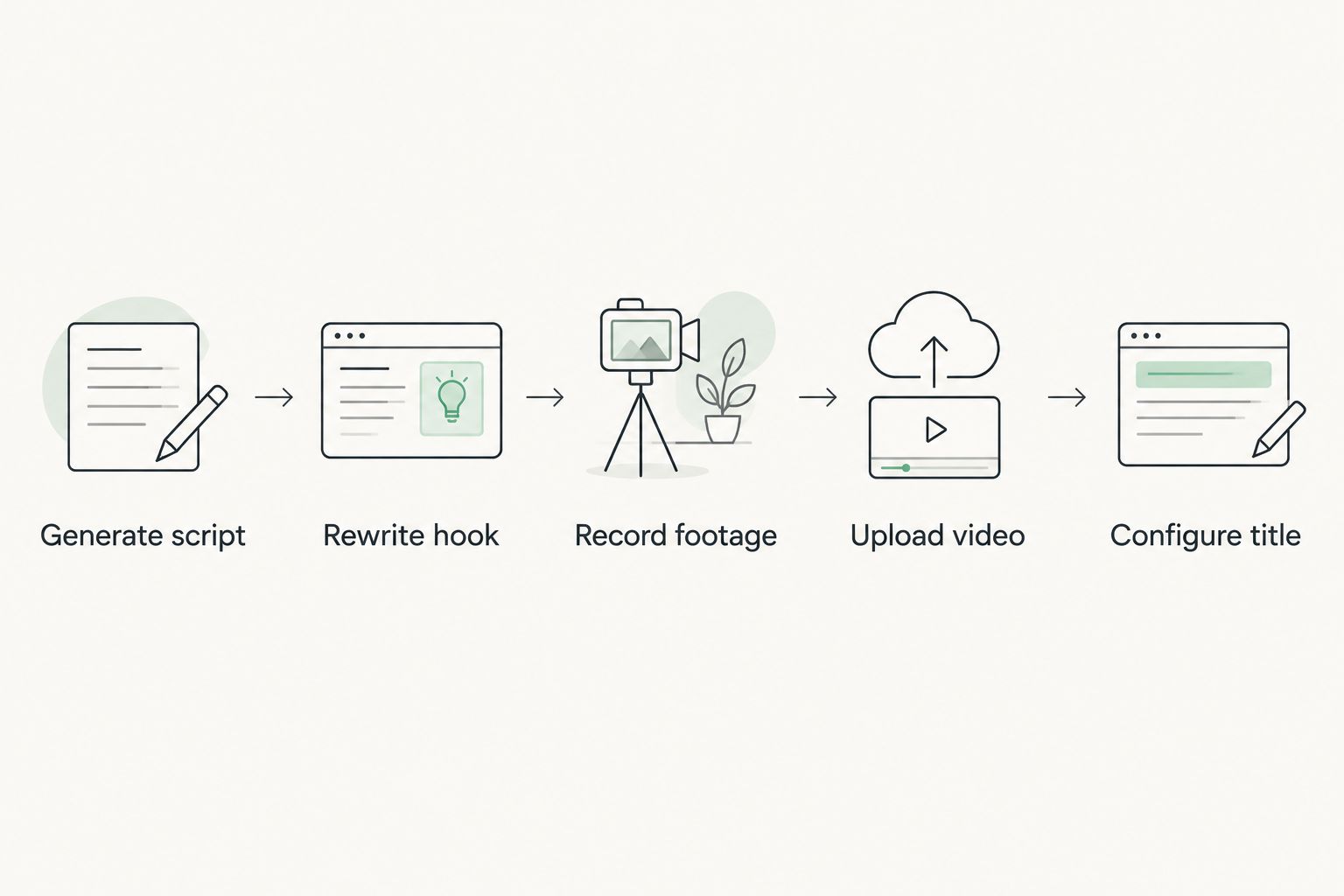
Recording a Reel script in Trender and then manually rewriting it for YouTube Shorts wastes the one thing that script already has going for it: a tested hook. Instead of rebuilding that hook from zero for a different platform, export the script from Trender's Workshop, run it through a short format adjustment, and upload it to YouTube Shorts with a title built for search instead of scroll.
- The Trender to YouTube Shorts workflow turns one idea, draft, or Reel link into a script you can re-cut for Shorts without rewriting from scratch.
- YouTube Shorts titles work like search queries, not scroll-stopping hooks, so only the hook line needs a rewrite, not the whole script.
- Trender's iPhone teleprompter records vertical footage that uploads to Shorts without re-cropping or re-exporting.
- Best for social media managers, SaaS founders, and creators already using Trender's Workshop for Instagram and TikTok who want the same script live on YouTube Shorts.
Why this matters
Most creators treat YouTube Shorts as an afterthought: export the Instagram Reel, drop it on YouTube, move on. That ignores how differently the two platforms surface content in 2026 - Instagram's feed runs on interest signals, YouTube Shorts runs on search intent baked into its title and description fields. A hook written to stop a scroll doesn't automatically work as a search phrase, which is the actual gap the Trender to YouTube Shorts workflow closes.
Trender's Workshop already produces a script, 15+ hooks, and a structure pulled from over 1 million analyzed Reels and carousels. The workflow below reuses that output instead of starting a second script from a blank page for every platform.
Before you start
- A Trender account with a finished script in Workshop, or a link to a Reel that already performed well and is ready to adapt.
- A YouTube channel with Shorts uploads enabled - any channel in good standing can publish Shorts in 2026, no separate approval needed.
- An iPhone with the Trender teleprompter installed if you're recording new footage instead of reusing an existing Reel clip.
- The gotcha: YouTube Shorts reads the on-screen hook and the video's title as separate signals inside YouTube's own search index. A hook written for Instagram's caption-first discovery won't carry the same weight on YouTube - budget time to rewrite the title, not just re-export the video, or the Short lands with zero search visibility.
Set up your script in Trender's Workshop
- Open Workshop and paste your idea, a rough note, or a link to a Reel that already performed well.
- Choose Reel script as the output format.
- Review the 15+ hooks Trender generates and select the one that states a single, clear claim in the first line - avoid hooks that depend on the visual to land, since those don't survive a platform switch.
- Click Generate script to produce the full script with hook, body, and CTA structure.
Expected result: a complete vertical-video script with a hook line you can test on more than one platform, plus a structure already matched to short-form pacing. If you're weighing Workshop against other tools for this exact step, the field comparison of Reel script generators breaks down where Trender's output differs from a plain script generator.
Rewrite the hook for YouTube Shorts search
- Copy the selected hook out of the finished script.
- Rewrite it as a phrase someone would type into YouTube's search bar rather than a phrase meant to stop a feed scroll - swap curiosity phrasing for the exact noun or problem the video solves.
- Keep the original Instagram-style hook for the on-screen text in the video if you're cross-posting the same clip; use the rewritten, search-oriented version only in the Title field on YouTube.
Expected result: two versions of the same idea - one built to stop a scroll, one built to match a search query - instead of one hook forced to do both jobs badly.
Record with the Trender teleprompter
- Open the teleprompter on iPhone and paste in the finished script.
- Set the scroll speed to match your natural talking pace, then start recording.
- Export the raw vertical clip directly from the teleprompter app.
Expected result: a 9:16 clip that already matches YouTube Shorts' vertical spec, so there's no cropping or re-exporting step before upload.
Upload and configure the YouTube Shorts fields
- In YouTube Studio, click Create, then Upload video.
- Set the Title field to the search-oriented hook rewrite, not the original Instagram-style hook.
- Add the script's key phrase into the Description field - YouTube's search index has more text to match against here than in the title alone.
- Confirm the Shorts shelf label appears before publishing. YouTube auto-detects vertical video under three minutes as a Short, but verify it before the video goes live so it doesn't get treated as a standard upload.
Expected result: a live Short with a search-matched title, sitting in the Shorts shelf, distinct from a long-form video on the same channel.
Turn a proven Reel into a Shorts repost instead
Some creators don't want a new script at all - they want a Reel that already worked on Instagram sitting on YouTube Shorts too. That's a variant of the same workflow, not a separate one.
- Paste the link to your best-performing Reel into Trender's Workshop instead of a fresh idea.
- Before repurposing it, confirm the Reel actually earned its performance rather than just going wide on reach - the breakdown on how to diagnose a Reel's metrics covers which numbers separate a genuinely strong Reel from one that just got lucky on distribution.
- Let Trender extract the hook and structure from the linked Reel and adapt it into a script.
- Run that adapted script through the same hook rewrite, teleprompter, and upload steps above.
Expected result: a Shorts upload built on a structure that's already proven, with only the title and on-screen hook adjusted for YouTube's search behavior.
“If a hook depends on the video to make sense, it won't survive being reduced to a YouTube Shorts title.”
Troubleshooting
- Script runs too long for a Short. Trim the middle section and leave the hook and CTA untouched - those two lines carry the most weight and shouldn't be the first thing cut.
- Hook only makes sense once the video is playing. YouTube search users see the title before they see any frame of video, so rewrite the on-screen hook to state the payoff up front instead of teasing it.
- Video gets uploaded as a standard video instead of a Short. Check the aspect ratio and run time - anything over three minutes or not shot vertically loses Shorts shelf placement automatically.
- On-screen text overlaps YouTube's interface. Leave margin in the bottom third of the frame - Shorts' like, comment, and subscribe buttons sit there and will cover burned-in captions placed too low.
- Teleprompter pacing feels off on playback. Slow the scroll speed and re-record rather than speeding up the edit afterward - a rushed voice reads as low-effort on a platform where viewers are already comparing pacing across dozens of Shorts.
Customize your workflow
The same script doesn't have to stop at one platform. Once it's live as a Short, the identical structure works as an Instagram carousel with different pacing, or as a Telegram post for audiences who don't watch video at all. If carousels are part of your repost plan, the swipe-rate breakdown is worth a separate read before you design one.
Founders running a small team through this exact workflow across multiple platforms should also look at how content strategy shifts specifically for SaaS-style audiences, since the hook and CTA structure that works for a consumer creator often needs different framing for a B2B feed.
Start your first script in Workshop
Generate a Reel script and 15+ hooks free, no credit card required.
FAQ
What is the Trender to YouTube Shorts workflow?
It's the process of generating a Reel script in Trender's Workshop, rewriting only the hook line for YouTube's search-driven title field, recording with Trender's teleprompter, and uploading directly to YouTube Shorts. The script and structure stay the same across platforms - only the title and on-screen hook change.
Can I use the same script for Instagram Reels and YouTube Shorts?
Yes, but the title needs a separate rewrite. Instagram surfaces Reels by interest signals, while YouTube Shorts surfaces videos by search match, so a scroll-stopping hook and a search-friendly title are two different lines of text pulled from the same script.
Does Trender's teleprompter work for YouTube Shorts specifically?
Yes. It records vertical footage at the 9:16 ratio YouTube Shorts requires, so there's no separate cropping or re-exporting step before uploading the clip.
How long should a YouTube Short be compared to an Instagram Reel?
YouTube treats any vertical video under three minutes as a Short in 2026, which gives more room than the tighter windows some Instagram formats favor. Keep the script trimmed regardless - long middles lose viewers on both platforms.
Is it better to write a new hook or reuse the Instagram hook on YouTube?
Reuse the original hook as on-screen text in the video, but write a separate, search-oriented version for the YouTube title field. The two serve different jobs: one stops a scroll, the other matches a search query.
Can I repurpose an old Reel into a YouTube Short instead of writing a new script?
Yes - paste the Reel's link into Trender's Workshop and it extracts the hook and structure to adapt into a new script. Check the Reel's actual performance metrics first so you're repurposing something that genuinely worked, not something that just got wide reach.
Why does my Short get uploaded as a regular video instead of a Short?
YouTube auto-detects Shorts based on vertical aspect ratio and a run time under three minutes. If either condition isn't met, the upload defaults to a standard video and loses Shorts shelf placement.
One last thing
The description field does more work on YouTube Shorts than most creators give it credit for - it's closer to a search snippet than an Instagram caption, and it's one of the only fields where the platform gives you real estate to state exactly what the video is about in plain language. Skip filling it out and the Short's title is doing all the search matching by itself.