Segment guide
Social media content creation for online course creators: complete 2026 guide
Ryze AI · Updated
Online course creator social media content is educational material shaped for social platforms with the aim of building trust and moving prospective students toward enrollment. This 2026 guide covers the full workflow, from curriculum research and hooks to repurposing and Reels performance analysis.
- Social media content creation for course creators starts with lessons, student questions, and objections—not random trends.
- Trndr is best for course creators who need platform-ready scripts, hooks, and carousels from one teaching idea.
- Use Reels for concise teaching moments and carousels for lessons that need a step-by-step explanation.
- Repurpose one lesson into five formats before researching another topic.
- Review retention, saves, replies, profile visits, and enrollment actions before repeating a format.
Why social media content creation matters for course creators
Course creators do not lack subjects. The curriculum, student questions, recurring mistakes, objections, and promised transformation already supply a deep topic library. The real constraint is converting that knowledge into formats people will stop to watch, read, save, and act on.
That constraint is sharper in 2026 because each platform requires different packaging. A lesson that works as a detailed email cannot simply be pasted into a Reel caption. A spoken explanation needs a hook, a clear teaching beat, visual direction, and a next step. A carousel needs a cover promise and a logical slide sequence.
The supplied product proof shows the scale behind this workflow: the platform is trained on more than 1M high-performing Reels and carousels and is used by 2,137+ creators. One featured customer reports gaining 5K Instagram followers and 2K Telegram followers from two Reels. Those are individual reported results, not a promise of what every course creator will achieve.
The practical lesson is simpler: content should connect the audience’s current problem to the part of your course that resolves it. Publishing becomes easier when every post has a defined source, format, audience stage, and intended action.
How to build your course content workflow
Use these seven steps as a repeatable production system. The manual method comes first in every step; software should reduce formatting and research work, not replace your subject expertise.
1. Map your curriculum to content pillars
Start with your existing curriculum instead of an empty content calendar. List each module, lesson, worksheet, exercise, and recurring support question, then group related items under a small set of content pillars.
A useful pillar is broad enough to support multiple posts but narrow enough to attract the intended student. A course about client acquisition might separate positioning, prospecting, sales calls, proposals, and retention rather than using one vague business-growth pillar.
Finish the map before choosing formats. This prevents the calendar from becoming a collection of disconnected trends that attract attention but do not lead naturally toward the course.
- Turn each course module into a named content pillar
- Add questions collected from comments, calls, email, or community discussions
- Record objections that stop qualified prospects from enrolling
- Mark lessons that can stand alone without the full course
- Remove topics that attract people outside the intended student profile
2. Match each topic to an audience stage
Not every follower is ready for a course pitch. Some people are identifying the problem, others are comparing approaches, and a smaller group is deciding whether your teaching style fits them.
Assign each idea to discovery, evaluation, or decision before writing. Discovery content names a problem or corrects a misconception. Evaluation content explains a method, trade-off, or process. Decision content addresses fit, expectations, and the next action without turning every post into an advertisement.
This classification also keeps launch content balanced. If every post assumes the audience already understands the problem, the account becomes difficult for a new follower to enter.
- Use misconceptions and overlooked symptoms for discovery content
- Use tutorials, frameworks, and demonstrations for evaluation content
- Use course fit, prerequisites, and expectations for decision content
- Give each post one audience stage rather than serving all three
- Check that a weekly plan contains more than direct promotion
3. Research hooks before drafting scripts
Manual hook research starts with public posts already earning attention in your subject area. Save relevant examples, identify the opening structure, and rewrite the structure around your own lesson. Copy the pattern, not the creator’s wording or claims.
Look beyond direct competitors. Adjacent educators often reveal clearer ways to frame the same underlying objection. A language teacher, fitness coach, and software instructor can all use a misconception hook, but the supporting lesson remains specific to their expertise.
Trndr reduces this research step by analyzing high-performing Instagram and TikTok posts and generating platform-ready hooks from an idea, thesis, draft, rough note, or successful Reel link. Compare that workflow with other AI Reels script generators before deciding which research process fits your production schedule.
- Save hooks that address the same audience problem as your course
- Label each hook as a question, claim, mistake, contrast, or demonstration
- Draft several openings before writing the body of the post
- Preserve your own examples, terminology, and point of view
- Reject hooks that promise an outcome the lesson cannot support
4. Build every Reel around one teaching moment
A Reel is easier to follow when it resolves one question. Choose a single teaching moment from the curriculum, state the problem in the hook, explain the relevant idea, and close with a specific next action.
Write spoken words separately from on-screen text. The spoken script carries the explanation; on-screen text highlights the point for viewers who need visual context. Recording notes can identify demonstrations, examples, or cuts without bloating the script itself.
Do not compress an entire module into one post. Split a larger lesson into a sequence of self-contained teaching moments, each useful without requiring viewers to watch the preceding post.
- Open with the exact problem the lesson resolves
- Teach one concept instead of summarizing a complete module
- Add one example drawn from your real teaching material
- Write on-screen text separately from the spoken script
- End with one relevant action, question, or resource
5. Turn structured lessons into carousels
Use a carousel when the idea benefits from stages, categories, examples, or side-by-side distinctions. The cover should communicate the lesson’s outcome, while each following slide should advance one part of the explanation.
Draft the slide sequence as plain text before opening a design tool. This exposes gaps in the argument and prevents design decisions from controlling the lesson. Once the sequence works, apply a consistent template and edit each slide for readability.
Trndr can convert source material into carousel copy and design-ready structures. The manual principles still apply: one main idea per slide, a logical progression, and a final action that matches the lesson. The guide to making an Instagram carousel that gets swipes explains the format in more detail.
- Write the complete slide outline before designing
- State the reader outcome on the cover
- Give each slide one main teaching job
- Use examples where an abstract instruction could be misunderstood
- End with a summary or one relevant next step
6. Repurpose one lesson across five formats
Repurposing works when the core idea stays consistent but the delivery changes. Do not paste identical text across platforms. Adapt the opening, depth, pacing, and next action to the behavior expected in each format.
A concise teaching moment can become a Reel script. Its ordered explanation can become a carousel. The supporting detail can become a long-form post, while one strong claim can anchor a thread or Telegram post. This approach extracts more value from course knowledge that has already been developed and checked.
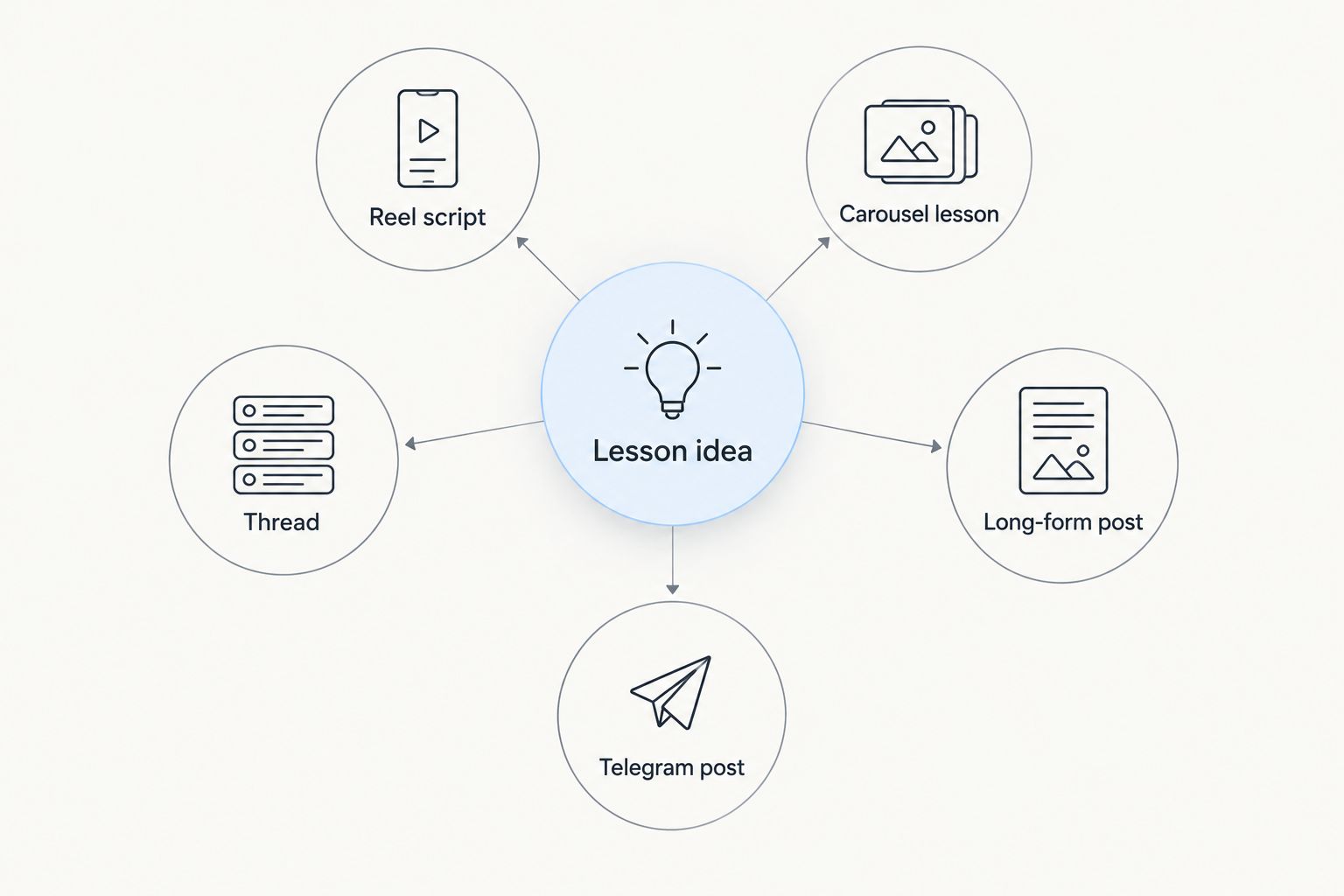
The 2026 objective is not to occupy every channel. Choose the formats your intended students use and that you can maintain without weakening the teaching.
- Convert the main claim into a short Reel script
- Expand ordered points into a carousel lesson
- Use supporting detail for a long-form post
- Break related observations into a thread
- Adapt the lesson for a Telegram post when that channel serves your audience
7. Measure signals tied to the content’s job
Evaluate each post against its assigned audience stage. A discovery post should show whether people stayed for the explanation or visited the profile. An evaluation post should reveal whether people saved, shared, replied, or requested more detail. Decision content should be assessed against the action it asks people to take.
Keep a simple spreadsheet if you are working manually. Record the topic, hook type, format, audience stage, publication date, relevant platform metrics, and any enrollment-related action you can verify. Compare like with like instead of judging every post by the same metric.
A monthly 2026 review should produce a decision: repeat the topic, revise the hook, change the format, or stop using the angle. Do not label a lesson unsuccessful until you have separated the subject from its packaging.
- Compare posts serving the same audience stage
- Track retention and completion for video lessons
- Track saves and shares for reference-style carousels
- Record replies, profile visits, and verified enrollment actions
- Retest a strong lesson with a different hook or format
Turn one lesson into five formats
Create hooks, Reel scripts, and carousels from material you already teach.
Content creation options for course creators
The right production method depends on available time, editorial control, and the number of formats required. Every option needs human review because the course creator remains responsible for factual accuracy, examples, and promises.
| Option | Best for | Main advantage | Key limitation |
|---|---|---|---|
| Manual research and writing | Creators publishing a small number of detailed posts | Maximum control over teaching and voice | Research, adaptation, and formatting stay with the creator |
| General-purpose writing assistant | Creators who already have a defined content system | Produces drafts from clear instructions | Platform structures and performance research require extra work |
| Freelance content specialist | Creators delegating recurring production | Adds human editing and production support | Onboarding and subject-matter review remain necessary |
| Trndr | Course creators turning lessons into multiple social formats | Combines post research, hooks, scripts, carousels, and analysis | Generated material still requires the creator’s factual review |
Trndr is best for course creators who have expertise and source material but need a faster path from lesson to platform-ready content. It is not a substitute for validating claims, protecting student information, or deciding what the course should teach.
Common mistakes course creators make
Publishing disconnected tips
Random tips can earn attention without helping a prospective student understand the course’s central method. Tie each post to a curriculum pillar and audience stage so the account builds a coherent body of teaching.
Turning every post into a course pitch
A direct promotion cannot replace useful discovery and evaluation content. Teach the relevant concept first, then use a next action that matches the reader’s level of awareness.
Copying a successful creator’s wording
A proven structure can inform research, but copied examples, claims, or phrasing weaken the creator’s point of view. Adapt the structure around your own curriculum, evidence, and teaching language.
Confusing output volume with progress
More posts do not automatically produce better course demand. A smaller set of posts tied to clear audience problems provides cleaner feedback about which lessons and formats deserve repetition.
Ignoring the review step
Generated scripts can misstate terminology, simplify a nuanced lesson, or introduce a promise you do not make. Review every hook, example, and call to action before publishing.
FAQ
What is social media content creation for course creators?
Social media content creation for course creators turns curriculum knowledge into platform-specific posts that teach, build trust, and support enrollment. Typical formats include Reels, carousels, threads, captions, and long-form posts.
What should a course creator post on social media in 2026?
A course creator should post lessons, misconceptions, demonstrations, student questions, objections, and explanations drawn from the curriculum. Each post should serve discovery, evaluation, or decision rather than trying to handle every stage at once.
Are Reels or carousels better for online courses?
Reels fit concise demonstrations and spoken teaching, while carousels fit ordered explanations, categories, and reference material. Use the format that matches the lesson instead of treating one format as universally better.
How can I create course content without starting from scratch?
Start with existing modules, worksheets, support questions, and recorded explanations. Turn one teaching moment into a Reel, carousel, long-form post, thread, or Telegram post by changing the structure rather than the core lesson.
Can Trndr write social media posts from a course lesson?
Yes. Trndr can turn an idea, thesis, rough note, draft, or successful Reel link into hooks, Reel scripts, carousels, threads, and long-form content. The course creator should review factual claims and teaching details before publishing.
How do I know whether course content is working?
Judge content against its assigned purpose. Review video retention for teaching Reels, saves and shares for reference posts, and verified profile visits, replies, or enrollment actions when the post asks for them.
Should course creators follow social media trends?
Course creators should use a trend only when its structure supports a real lesson for the intended student. Skip trends that force an unrelated topic, distort the teaching, or attract the wrong audience.
One last thing
Your strongest 2026 content source is probably not a new trend. It is the lesson you repeatedly explain in comments, calls, or community discussions because students keep getting stuck at the same point. Document that explanation once, then adapt it into the formats your audience already consumes.