Question page
Instagram Reels Dimensions and Size Guide for 2026
Ryze AI · Updated
Instagram Reels dimensions in 2026 are 1080 x 1920 pixels, a 9:16 vertical ratio that fills the full phone screen edge to edge. Get the ratio wrong and Instagram crops or letterboxes your video before it ever reaches the algorithm — the platform doesn't ask, it just cuts.
- Instagram Reels dimensions are 1080 x 1920 pixels, 9:16 ratio, with a 500 x 888 pixel minimum in 2026.
- The feed grid crops every Reel to 4:5 (1080 x 1350) — top and bottom content gets hidden on your profile.
- Reels cover images use a separate 420 x 654 pixel crop, which is why profile thumbnails often look mismatched.
- Keep text, logos, and captions out of the top and bottom safe zones — Instagram's UI overlays that space.
- Trender's teleprompter and script tools default to the 9:16 frame so recordings match this reels size guide from the first take.
Why this matters
A video shot at the wrong resolution doesn't just look soft — it gets pillarboxed with black bars, or Instagram's algorithm treats the mismatch as a signal the creator didn't optimize for the platform. Either way, watch time drops in the first three seconds, and that's the metric Instagram weighs hardest for distribution in 2026.
Most creators lose distribution not because the idea is weak but because the export settings are wrong. Trender builds scripts and shot lists around the 9:16 frame by default, so the recording step doesn't undo the work already done on the hook.
Instagram Reels Dimensions in 2026
Here's every dimension that matters for a Reel, side by side:
| Placement | Dimensions | Aspect ratio | Notes |
|---|---|---|---|
| Reels video (recommended) | 1080 x 1920 px | 9:16 | Full-screen export, sharpest result |
| Reels video (minimum accepted) | 500 x 888 px | 9:16 | Below this, Instagram upscales and detail suffers |
| Feed grid crop | 1080 x 1350 px | 4:5 | What shows in your profile grid and some feed placements |
| Reels cover image | 420 x 654 px | roughly 9:14 | The static thumbnail on your profile |
The recommended 1080 x 1920 pixel frame is the one to export at. Everything else on this table is a crop Instagram applies automatically, not a size you choose when you record.
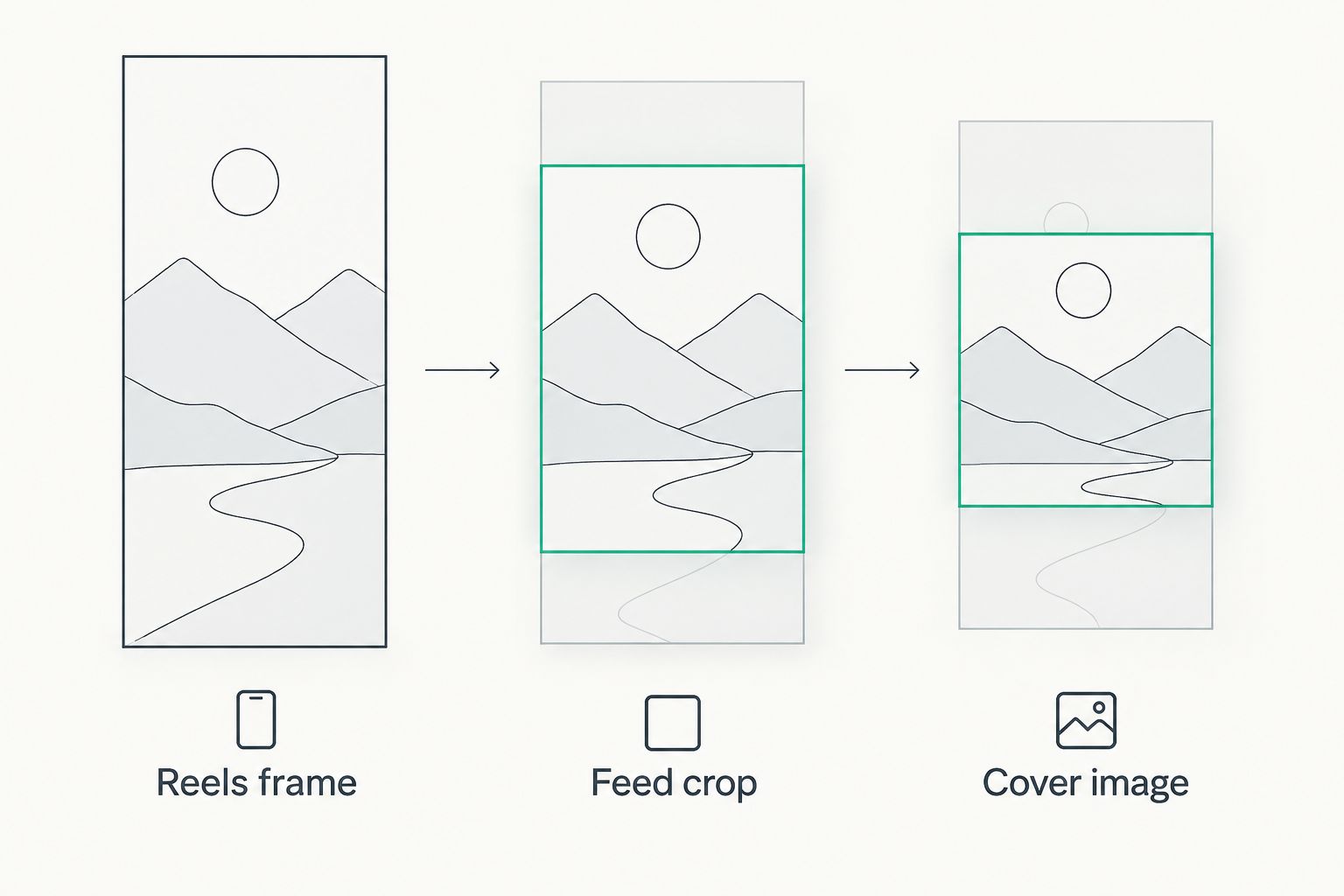
Reels Video: 1080 x 1920 Pixels (9:16 Ratio)
1080 x 1920 pixels is the export resolution to build your entire shoot around. This is the full Reels frame — the one people see when they scroll the Reels tab or open your Reel directly. Shoot vertically from the start; footage shot horizontally and rotated loses resolution and adds black bars on both sides.
A 500 x 888 pixel file still uploads, but Instagram stretches it to fit the 1080 x 1920 frame, and the stretch is visible on anything with text or fine detail. If your camera app defaults to a lower resolution, change it before you shoot — fixing it in post costs more time than it saves.
Feed Grid Crop: 1080 x 1350 Pixels (4:5 Ratio)
Every Reel that shows up in your profile grid gets cropped to 4:5, cutting off the top and bottom of the original 9:16 frame. This is the hidden cost the full-frame export doesn't warn you about: a caption sitting near the top of your video, safe inside the 9:16 frame, can fall outside the 4:5 grid crop entirely.
This matters most for hooks placed as on-screen text. If the hook text sits in the top 10% of the frame to grab attention fast, check how it looks in the 4:5 crop before publishing — that's the version a browsing viewer sees first on your profile.
Reels Cover Image: 420 x 654 Pixels
The cover image is a separate 420 x 654 pixel crop, and it's the single most skipped step in Reels sizing. Instagram auto-selects a frame from your video as the cover unless you upload one manually, and the auto-selected frame is rarely the flattering one.
Set a custom cover after you upload the Reel, sized or cropped to roughly 420 x 654 pixels, so your profile grid reads as a cohesive row of thumbnails instead of nine randomly frozen frames.
Why Reels dimensions vary
A handful of factors explain most sizing problems creators run into:
- Camera orientation — footage shot horizontally forces Instagram to pillarbox it inside the 9:16 frame, shrinking the visible video.
- Repurposed content — a video pulled from TikTok or YouTube Shorts is usually already 9:16, but export compression settings differ enough to cause a visible quality drop on re-upload.
- Feed grid crop — the 4:5 crop cuts the top and bottom of the 9:16 frame, which is why text placement matters more than most creators assume.
- Cover image crop — the 420 x 654 pixel cover is chosen separately from the video body, so a great video can still have an awkward cover.
- On-screen elements — Instagram adds its own captions, profile icon, and action buttons over parts of the frame, which is why safe zones exist in the first place.
- Older source footage — video shot years ago in 1:1 or 4:3 needs padding to fit 9:16, and padding always looks worse than a native vertical shoot.
Script your next Reel in the right frame
Turn one idea into a Reel script built for the 9:16 format from the start.
What resolution should you export a Reel at?
Export at 1080 x 1920 pixels, the standard 9:16 Reels resolution for 2026. Anything lower gets upscaled by Instagram on upload, and anything higher gets downscaled — 1080 x 1920 is the size that survives compression with the least visible loss.
Does Instagram compress your Reels video?
Yes, Instagram compresses every video uploaded as a Reel, regardless of the source file's original quality. Exporting at 1080 x 1920 pixels with a reasonably high bitrate before upload gives the compression engine more detail to preserve, which is the only lever a creator actually controls.
What's the safe zone for text on a Reel?
The safe zone sits roughly 250 pixels from the top and 320 pixels from the bottom of the 1080 x 1920 frame, where Instagram's own UI elements — the caption, username, sound title, and action buttons — sit on top of the video. Text or logos placed inside those margins get partially or fully covered on most viewers' screens.
Should you shoot vertical or crop from horizontal?
Shoot vertical whenever the option exists. Cropping horizontal footage down to 9:16 always removes usable frame width, and static or minimally-moving horizontal shots crop far worse than footage recorded natively at 1080 x 1920.
Why does my Reel look different in the grid than in the Reels tab?
Because the profile grid uses the 1080 x 1350 pixel, 4:5 crop, while the Reels tab shows the full 1080 x 1920 pixel, 9:16 frame. It's not a bug — it's two different crops of the same source file, and both need checking before you publish.
FAQ
What are the correct Instagram Reels dimensions in 2026?
Instagram Reels dimensions are 1080 x 1920 pixels, a 9:16 vertical aspect ratio, with a 500 x 888 pixel minimum accepted resolution in 2026. Anything smaller gets upscaled and loses sharpness.
What size should a Reels cover image be?
A Reels cover image is roughly 420 x 654 pixels, a separate crop from the video itself. Set it manually after upload instead of relying on Instagram's auto-selected frame.
Why does my Reel get cropped in the feed?
Instagram crops Reels to a 4:5 ratio, or 1080 x 1350 pixels, when they display in the profile grid and some feed placements. The full 9:16 frame only shows in the dedicated Reels tab.
Can I upload a square or horizontal video as a Reel?
Yes, but Instagram pillarboxes or crops it to fit the 9:16 frame, shrinking the usable video area. A native 1080 x 1920 pixel vertical export always looks sharper.
What's the ideal Reels video length in 2026?
Reels support videos up to 3 minutes long in 2026, though shorter Reels under 30 seconds generally hold watch-through rate better for cold audiences.
Does Instagram reduce video quality after upload?
Yes, Instagram compresses every uploaded Reel regardless of source quality. Exporting at 1080 x 1920 pixels with a solid bitrate gives the compression step more detail to work with.
Where's the safe zone for text on a Reel?
The safe zone sits about 250 pixels from the top and 320 pixels from the bottom of the 1080 x 1920 frame, where Instagram's caption and button overlays sit. Keep key text and logos outside that margin.
Is 1080 x 1920 the same as 9:16?
Yes, 1080 x 1920 pixels is the exact pixel dimension of a 9:16 aspect ratio, which is the standard vertical frame Instagram Reels uses in 2026.
One last thing
The cover image crop — 420 x 654 pixels — is the detail almost nobody checks before publishing, and it's the reason a strong Reel can still make a profile grid look inconsistent. Set the cover manually on every upload instead of trusting the auto-selected frame; it takes ten seconds and it's the first thing a new visitor to your profile actually sees.
If your Reels keep underperforming even at the right dimensions, the problem usually isn't the export settings — analyzing your Reels metrics after the fact tends to point at the hook or the first three seconds, not the frame size.