Question page
How to Create a Seamless Instagram Carousel
Ryze AI · Updated
Create a seamless Instagram carousel by designing the entire sequence on one master canvas, dividing it into equal slide-width sections, and exporting those sections in order. In 2026, use 1080 × 1350 pixels per slide for a portrait carousel or 1080 × 1080 pixels per slide for a square carousel. Keep the aspect ratio, guides, typography, colors, and margins consistent across every slide.
- A seamless carousel Instagram workflow starts with one master canvas, not separate slide files.
- Use 1080 × 1350 pixels per slide for a portrait carousel in 2026.
- Place vertical guides at equal intervals before adding text, images, or connecting elements.
- Export slides in order and inspect every crop before publishing.
- Trndr is best for creators who want ready-to-post carousel structure without building every slide manually.
Why this matters
A continuous design gives the reader a visual reason to swipe, but appearance alone does not make a useful carousel. Each slide still needs a clear point, readable text, and enough context to work when someone sees it without the previous slide.
The build process also affects editing speed. Designing separate files makes alignment changes repetitive because a new margin, type size, or background treatment must be copied manually. A master canvas keeps those decisions visible in one place, while this guide to making an Instagram carousel that gets swipes covers the editorial structure behind the design.
For 2026, treat continuity as a reading aid rather than a decorative effect. A line, photograph, shape, or background can cross a slide boundary, but the message on each individual slide must remain understandable.
How do you create a seamless Instagram carousel?
Build the complete carousel at full width, mark equal slide boundaries, design across those boundaries, and slice the finished canvas into individual files. The table shows the core setup before the detailed steps.
| Decision | Portrait carousel | Square carousel |
|---|---|---|
| Slide size | 1080 × 1350 pixels | 1080 × 1080 pixels |
| Aspect ratio | 4:5 | 1:1 |
| Best for | Educational posts and mobile feed space | Profile-grid consistency and reusable square assets |
| Main limitation | Requires more vertical composition work | Provides less vertical room for text and images |
1. Decide what the swipe should reveal
Choose the carousel's purpose before opening the design tool. A tutorial can reveal one step per slide, a list can reveal one item per slide, and an argument can move from claim to evidence to recommendation.
Write a short outline with one job for each slide. The first slide earns attention, the middle slides develop the point, and the final slide closes the idea or gives the reader a next action. If two slides perform the same job, combine them before designing.
2. Set the slide size and master canvas
For a portrait carousel, each slide is 1080 × 1350 pixels. A five-slide master canvas is therefore 5400 pixels wide and 1350 pixels high. For a square carousel, five slides create a 5400 × 1080-pixel master canvas.
Use one orientation for the whole set. Instagram applies one crop format across a carousel, so files with mixed aspect ratios will not retain independent shapes inside the same post. The 4:5 portrait format is the practical default in 2026 when you want more vertical room in the feed.
3. Add equal guides before designing
Place a vertical guide at every slide boundary. On a portrait master canvas, that means a guide every 1080 pixels across the width. Name the slide areas in sequence so you can see where each export begins and ends.
Add a consistent inner margin inside every slide as well. The exact margin depends on the type size and visual density, but it must remain identical throughout the set. Keep essential words, faces, and icons away from the cut line; connecting backgrounds and decorative shapes can cross it.
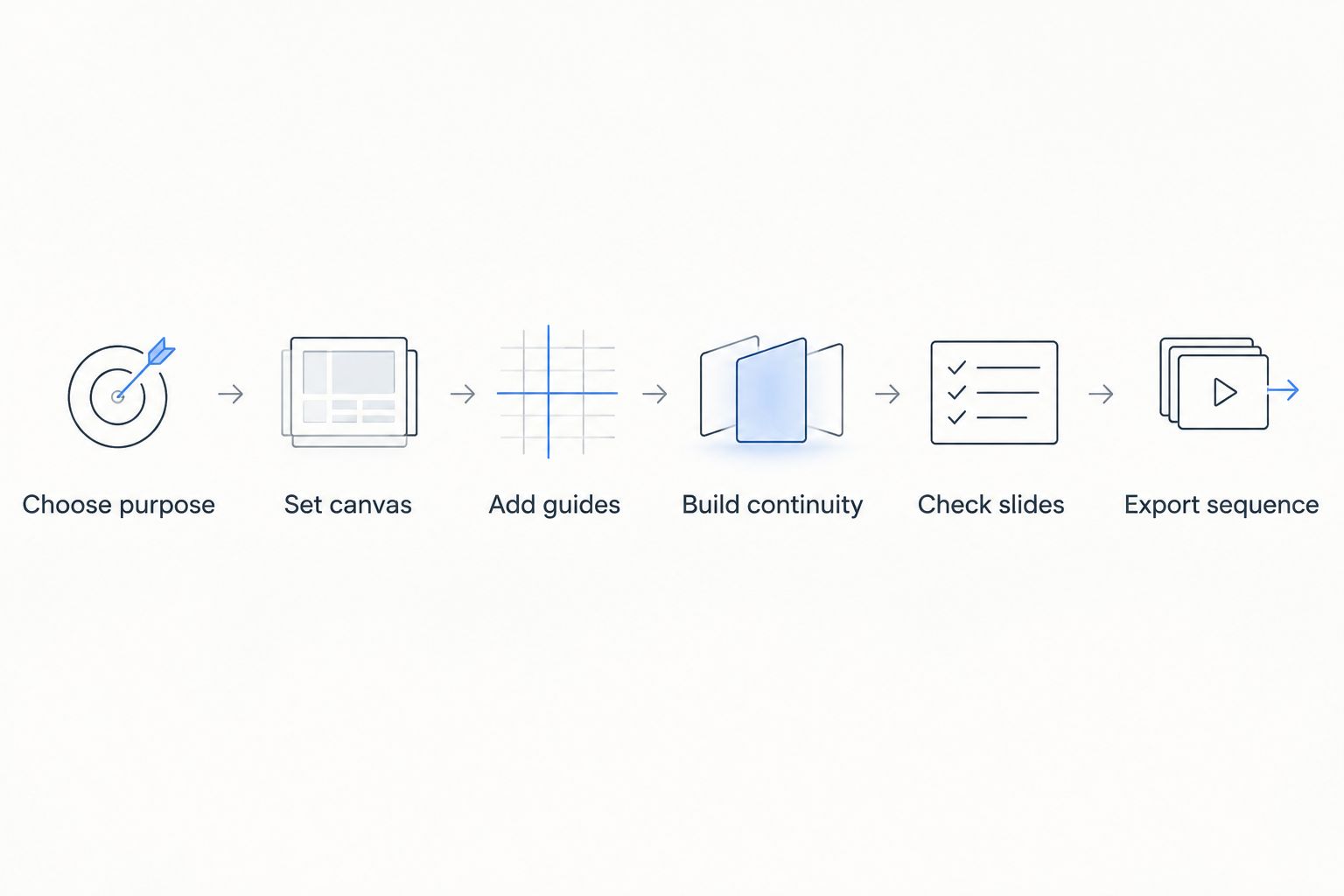
4. Build continuity across the boundaries
Choose one or two elements that continue from one slide to the next. Good options include a photograph, a background shape, a line, a texture, or a cropped illustration. Do not make every element cross the boundary; that produces visual clutter and weakens the reading order.
Use repetition for the elements that should stay fixed. Headings can use the same position and type scale, page markers can occupy the same corner, and body copy can follow one alignment rule. Continuity comes from both connection and consistency.
5. Make every slide understandable alone
A seamless canvas can tempt you to design one long poster, but Instagram displays one slide at a time. Each panel needs a complete statement or a clearly labeled part of a sequence.
Read the slides individually with the neighboring panels hidden. If a sentence depends on text that is no longer visible, rewrite it. If an image crop removes the subject, reposition it. The transition should reward the swipe without making the current slide confusing.
6. Slice and export the master canvas
Export each section at the exact dimensions selected at the start. PNG suits text, flat graphics, and sharp interface-style elements; JPEG suits photo-led slides where a smaller file is useful. Do not resize individual slides after slicing because that can shift alignment or soften typography unevenly.
Use ordered filenames such as carousel-01, carousel-02, and carousel-03. Leading zeroes keep the files in sequence when a device or file manager sorts names alphabetically. Open the exported files beside one another and confirm that every crossing element meets at the same height.
7. Preview the carousel on a phone
Upload the complete set as a draft and swipe through it on a phone before publishing. Check the opening slide first, then inspect every transition for unexpected crops, missing elements, duplicate slides, or incorrect order.
Also check readability at normal viewing size. A heading that looks comfortable on a desktop canvas can become cramped on a phone. Fix the source canvas and export the affected slides again rather than editing an isolated slide and introducing a new alignment difference.
Trndr can turn an idea or draft into ready-to-post carousel content and hooks, which removes part of the manual structuring work. Trndr is best for social media managers, creators, and small marketing teams that need repeatable carousel production, but every generated set still needs a final crop and readability check before publishing.
Build your next carousel
Turn one idea or draft into ready-to-post social content and hooks.
Which seamless carousel format should you use?
Choose the format based on how the audience will encounter the work, not on which transition looks most dramatic. A single-post carousel is the safest default because its slide order remains contained within one post.
| Format | Best for | Pros | Cons | Verdict |
|---|---|---|---|---|
| Single-post continuous carousel | Tutorials, arguments, lists, and visual stories | Keeps the sequence in one post and supports deliberate swiping | A weak individual slide can interrupt the story | Use for most 2026 carousel posts |
| Profile-grid panorama | Campaign art and profile-wide visual displays | Creates a larger composition across profile tiles | Later posts change the grid arrangement | Use only when the profile display is the goal |
| Modular carousel | Recurring educational series and templates | Each slide works alone while typography and layout stay consistent | The transitions look less like one uninterrupted image | Use for repeatable publishing systems |
The modular format is often the better operational choice. It keeps the background, spacing, and type system consistent while allowing each panel to be reused or revised without rebuilding the entire panorama. The continuous format is stronger when the transition itself carries meaning, such as a timeline or a photograph that reveals more with each swipe.
Trndr's carousel creation platform fits the modular and single-post approaches because it creates carousel content from an initial idea, draft, or source post. Its advantage is production speed across hooks and formats; its limitation is that your final visual review cannot be delegated to the generator.
Why seamless Instagram carousel quality varies
Several production choices determine whether the final carousel reads as one controlled sequence or a collection of unrelated panels:
- Canvas setup: A master canvas with equal sections prevents slide dimensions from drifting during design.
- Boundary placement: Important text or faces placed directly on a cut can become difficult to read when the slides separate.
- Typography: Consistent fonts, weights, line spacing, and alignment create continuity even when the imagery changes.
- Visual restraint: One connecting element is easier to follow than several competing elements crossing every boundary.
- Independent clarity: Every slide needs a complete idea because readers view one panel at a time.
- Export discipline: Equal dimensions, ordered filenames, and a final mobile preview protect the design after the creative work is finished.
A polished 2026 carousel balances two requirements that can pull in different directions: the slides must connect as a set, and each slide must make sense by itself. Prioritize independent clarity first, then add continuity where it helps the reader anticipate the next panel.
What size should a seamless Instagram carousel be in 2026?
A portrait Instagram carousel should use 1080 × 1350 pixels per slide in 2026. That is a 4:5 aspect ratio. Use 1080 × 1080 pixels and a 1:1 ratio when the design needs square assets or a square profile-grid composition.
The master-canvas width equals 1080 pixels multiplied by the number of slides. Keep the height fixed at 1350 pixels for portrait slides or 1080 pixels for square slides.
How many slides can an Instagram carousel contain?
An Instagram carousel can contain up to 20 photos or videos in 2026. That platform limit does not mean every idea needs 20 panels. Use only the slides required to present the promise, explanation, evidence, and conclusion without repetition.
For a continuous design, decide the slide count before calculating the master canvas. Adding or removing a panel after the layout is complete changes the composition and can force you to reposition connecting elements.
Can you create a seamless carousel without design software?
You need a tool that can maintain exact dimensions, guides, and ordered exports, but it does not need to be advanced professional software. Presentation tools, browser-based design products, and image editors can all work when they support a sufficiently wide canvas or repeatable frames.
Trndr is a social media content platform rather than a replacement for visual quality control. It can generate ready-to-post carousels and hooks from source material, while you remain responsible for checking the exported design against the 2026 dimensions and your chosen template.
FAQ
What is a seamless Instagram carousel?
A seamless Instagram carousel is a sequence designed on one master canvas so visual elements align across slide boundaries. Each exported slide remains separate, but the composition appears continuous while swiping.
What is the best Instagram carousel size in 2026?
The best portrait size is 1080 × 1350 pixels per slide in 2026. Use 1080 × 1080 pixels when a square format better suits the design.
How do I split a continuous image into carousel slides?
Create equal guides at every 1080-pixel interval, then export each guided section as a separate file. Keep every file the same height and preserve the original order.
Should text cross an Instagram carousel boundary?
No, essential text should stay inside one slide. Backgrounds, photographs, lines, and decorative shapes are safer elements to continue across a boundary.
Is a portrait carousel better than a square carousel?
A portrait carousel is better when you need more vertical room in the feed, while a square carousel is better for reusable square assets. Both work when every slide uses the same ratio.
Can Trndr create Instagram carousel content?
Yes, Trndr can generate ready-to-post carousel content and hooks from an idea, draft, or source post. You still need to inspect typography, crops, and slide order before publishing.
Why do my carousel slides fail to line up?
Misalignment usually comes from unequal slide dimensions, misplaced guides, inconsistent resizing, or exports taken from separate canvases. Return to one master canvas and export every section with identical settings.
How do I check a carousel before posting?
Upload the complete sequence as a draft and swipe through it on a phone. Check order, crops, boundary alignment, text size, and the clarity of every individual slide.
One last thing
Save a low-resolution contact sheet that displays every slide in one row before you archive the project. It gives you a fast way to verify the narrative order later without reopening the master canvas, and it makes duplicated or missing slides obvious during the final 2026 review.
Do not treat the last slide as leftover space. It should resolve the promise made on the opening slide and tell the reader what to remember, save, discuss, or do next.