Integration guide
Automatically turn viral TikTok posts into Reels scripts
Ryze AI · Updated
Instead of manually dissecting a viral TikTok and rewriting it for Instagram, paste the post into Trndr and use its structure, hook, and pacing to create a Reels script. This 2026 workflow shows you how to adapt the idea without copying the original creator’s wording, footage, or identity.
- Trndr turns viral TikTok posts into Reels scripts automatically from a source link and your creative brief.
- The best 2026 workflow preserves the source structure while changing the argument, examples, language, and audience.
- Choose a Reels script for spoken ideas and a carousel for lists, frameworks, or step-by-step lessons.
- Trndr is best for creators and small marketing teams that need research, scripting, design, and recording in one workflow.
Why this matters
A viral TikTok gives you a visible reference for the opening, sequence, and payoff. It does not give you permission to copy the script, and it does not guarantee that the same idea will work for your Instagram audience.
The useful part is the structure: how the post earns attention, introduces tension, delivers information, and closes. In 2026, the fastest repeatable process is to extract that structure, add your own thesis, and generate a platform-ready Instagram version.
Trndr is best for creators, social media managers, boutique agencies, and SaaS founders who want a TikTok-to-Reels script workflow without moving between separate research, writing, design, and recording tools.
The platform is trained on more than 1 million high-performing Reels and carousels. It can also generate more than 15 hook options and supports five ready-to-post formats from one idea, draft, note, or source post. Those numbers describe the available workflow; they do not remove the need for fact-checking and editorial review.
Before you start
Prepare these inputs before opening the workflow:
- A source post you can access. Copy the full TikTok URL and confirm that it opens outside your logged-in feed. A private, deleted, age-restricted, or region-restricted post can block analysis.
- A one-sentence thesis. Write the point you want your Reel to make. The source post supplies a structure, not your final argument.
- A defined viewer. Name the person, problem, and level of awareness the script should address. A brief for SaaS founders needs different examples from one written for social media managers.
- Your intended action. Decide whether the viewer should comment, save the post, follow the account, visit a page, or reconsider a belief.
The non-obvious gotcha is context dependency. Duets, stitches, reaction posts, trend audio, and visual jokes often make sense only beside the original video. If the source depends on another creator’s face, words, or timing, extract the underlying pattern and replace the context before generating your final script.
For a clean 2026 adaptation, keep a short note with four lines: audience, problem, thesis, and desired action. That note prevents the output from becoming a generic paraphrase of the source.
Choose the source post
- Open Workshop in Trndr.
- Start with the TikTok URL rather than a blank prompt.
- Add your one-sentence thesis beside the source material so the platform knows what you want to say, not only what the original post said.
- Identify the source format: opinion, list, tutorial, story, objection, reaction, or before-and-after explanation.
- Write down the opening device. Common devices include a direct claim, a question, a mistake, a contradiction, or an unfinished thought.
Do not choose a source only because it has visible engagement. Choose it because its structure fits a point you can support with your own experience, evidence, or examples. A viral entertainment post usually makes a poor source for a detailed product tutorial, even when its opening line is strong.
Expected result: you have one accessible source URL, one original thesis, one defined audience, and one format that can work without the source creator’s footage or identity.
Configure the adaptation brief
The brief determines whether the result sounds like your content or a surface-level rewrite. Add the following instructions with the source link:
- Name the destination. Specify Instagram Reels so the output is written for spoken delivery and a vertical video sequence.
- Define the viewer. Use a concrete role and problem, such as an independent SaaS founder struggling to publish consistently.
- State your argument. Give the script one claim to prove instead of a broad topic to summarize.
- Set the voice. Describe the delivery with plain terms such as direct, analytical, conversational, skeptical, or instructional.
- Set boundaries. Tell the platform which claims, examples, phrases, and calls to action must not carry over from the source.
A useful brief reads like this: adapt the structure for an Instagram Reel aimed at boutique agency owners; argue that research is the real content bottleneck; use direct language; replace every example; do not repeat the source hook verbatim.
The brief should separate elements you want to retain from elements you need to change. Retain the sequence, tension, and type of payoff. Change the wording, thesis, examples, audience, evidence, and closing action.
Expected result: the platform has enough context to produce an original Reels script rather than a lightly edited transcript.
Generate and review the Reels script
- Generate the first Reels script from the source post and adaptation brief.
- Review the opening without reading the rest. It should identify a problem or create a clear information gap in the first spoken line.
- Generate the available hook variations and shortlist the three that best match your actual opinion. Trndr can produce more than 15 hooks, but you only need one that the rest of the script can support.
- Check each script beat against the source. Keep the functional sequence while removing distinctive phrases, examples, metaphors, and personal details from the original.
- Replace unsupported claims with facts you can verify or observations you can attribute to your own work.
- Read the script aloud. Cut formal transitions, repeated setup, and any sentence you cannot say naturally in one breath.
- Save the final version and move it into the iPhone teleprompter when you are ready to record.
A strong adaptation should still make sense to someone who has never seen the TikTok. If the script depends on phrases such as this creator, that video, or this trend, it is not yet independent enough to publish.
Expected result: you have a spoken Reels script with an original hook, a clear sequence, verifiable claims, and a closing action suited to your Instagram audience.
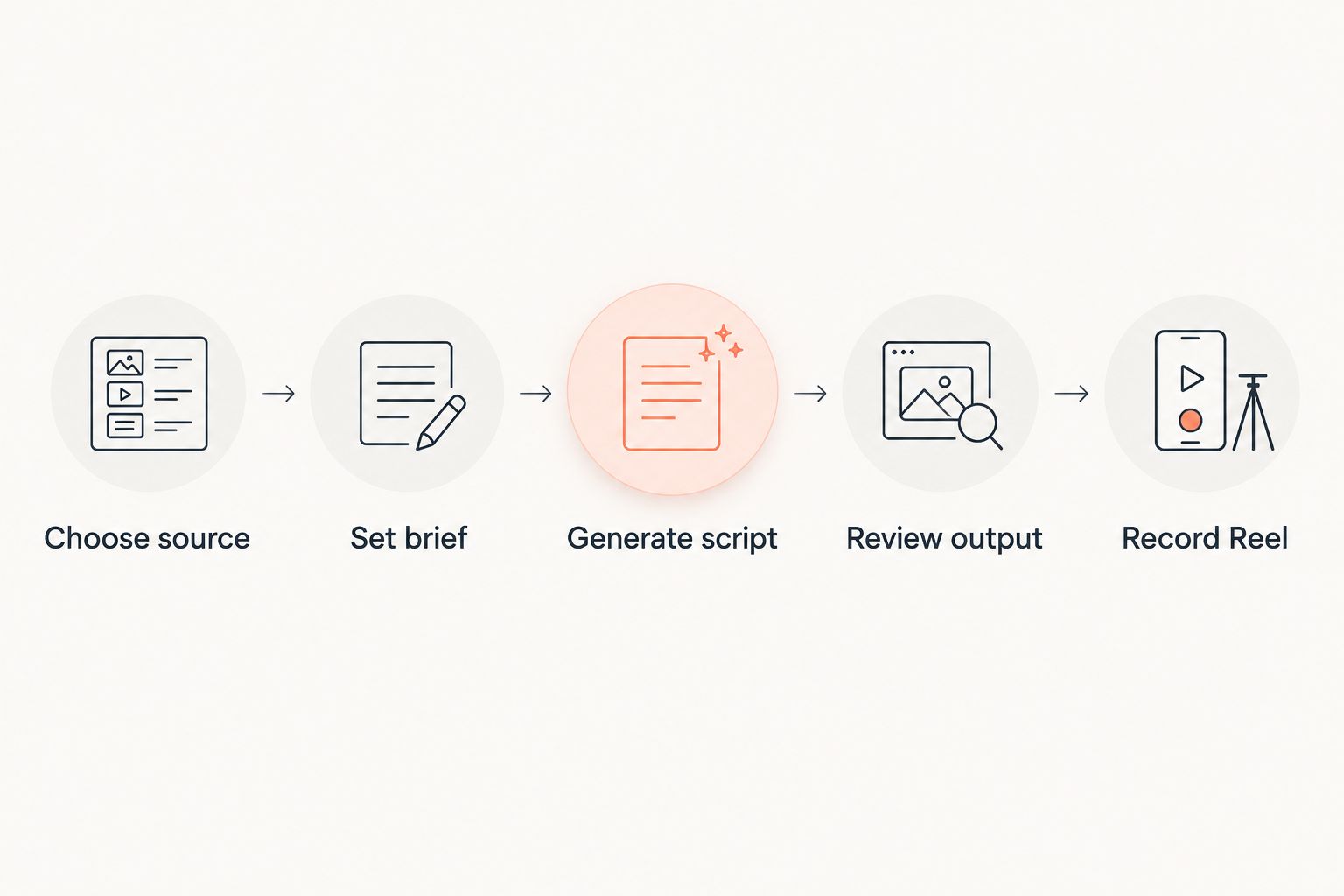
Where Trndr fits—and where it does not
Trndr covers research, creation, carousel design, recording, and analysis in one content workflow. That makes it useful when the main problem is moving from an observed idea to something ready to produce.
Its constraint is the same one that applies to every script generator: the platform cannot decide whether an external claim is true, whether you have permission to reuse media, or whether an argument reflects your real expertise. You remain responsible for originality, factual accuracy, permissions, and the final editorial decision.
| Output | Best for | Main strength | Main constraint |
|---|---|---|---|
| Reels script | Opinions, stories, demonstrations, spoken explanations | Converts the structure into a recordable sequence | Needs a natural read-aloud edit |
| Carousel | Lists, frameworks, comparisons, step-by-step lessons | Separates the idea into swipeable sections | Needs concise copy on every slide |
Use the Reels script when delivery and personality carry the idea. Use the carousel when the reader needs to pause, compare, or save individual points.
Turn the same TikTok into a carousel
One source post can support a second workflow when its value comes from ordered information rather than performance. A list, framework, checklist, or sequence often translates cleanly into a carousel because each idea can occupy a separate slide.
- Return to the same source analysis instead of starting with a different TikTok.
- Keep the audience and thesis from your Reels brief so both formats make the same argument.
- Request a carousel version and assign one job to each slide: opening claim, problem, explanation, supporting points, and final action.
- Choose a carousel design template, then shorten any slide that requires paragraph-length copy.
- Check that the first slide works without the caption and that each later slide advances the argument.
- Remove any visual instruction that relies on footage from the original TikTok.
Do not publish the Reel script as blocks of text pasted onto slides. Spoken sentences rely on tone and timing; carousel copy relies on hierarchy, scanning, and controlled information density. Keep the core idea consistent while rewriting the delivery for the format.
Expected result: you have a Reels script for spoken delivery and a carousel version for swipe-based reading, both built from the same original thesis rather than copied source language.
Troubleshooting
The source link cannot be analyzed
Open the URL in a private browser window. If the post is unavailable, private, deleted, or restricted, use your written thesis or rough notes as the starting material in Workshop. Do not use an unofficial download as a workaround unless you have the rights to the media.
The script sounds too similar to the TikTok
Remove the source wording from your brief and describe only its structure. Then require a different audience, argument, example set, and closing action. Compare the scripts line by line before publishing; matching phrasing needs to be rewritten, not disguised with synonyms.
The output is generic
Your brief is missing a specific buyer, problem, or opinion. Replace a broad instruction such as make this about marketing with a narrower one: explain why independent SaaS founders stall between research and recording, then give them a repeatable workflow.
The hook promises more than the script delivers
Choose a hook only after reviewing the body. Every number, result, comparison, or absolute claim in the opening must be supported later in the script. A less dramatic hook with a complete payoff is stronger than a bold claim followed by generic advice.
The script feels awkward when spoken
Move the final draft into the iPhone teleprompter and read it at your normal pace. Shorten sentences that force an unnatural pause, replace written transitions with conversational ones, and separate dense explanations into distinct beats.
The published Reel underperforms
Do not blame the topic without checking retention, saves, shares, comments, and the relationship between the opening and payoff. Use the Reels metrics diagnosis and next-tests guide to isolate what to change in the next version.
Customize your 2026 workflow
Once the basic adaptation is reliable, create a repeatable source library. Save TikToks by structure rather than subject: direct claim, mistake, list, objection, tutorial, story, or contrarian argument. This makes it easier to match a new thesis with a format that has already held attention.
For client or team work, add three review gates:
- Strategy review: confirm the topic supports the account’s content goals.
- Editorial review: verify claims, originality, tone, and examples.
- Production review: confirm the script can be recorded with the available footage and speaker.
SaaS founders should also connect each adapted script to a defined content pillar rather than chasing unrelated viral topics. The social media content strategy for SaaS founders explains how to choose those pillars and turn them into a repeatable publishing system.
Build your first Reels script
Bring a TikTok link, thesis, or rough note into Workshop and turn it into platform-ready content.
FAQ
Can I turn viral TikTok posts into Reels scripts automatically?
Yes. Trndr analyzes viral TikTok content and generates a Reels script from the source structure plus your audience, thesis, and creative direction.
Should I copy the hook from a viral TikTok?
No. Preserve the hook type or function, then write original language that fits your argument and audience. Copying distinctive wording creates originality and rights problems.
How many hooks can I generate for one Reels script?
The platform can generate more than 15 hooks for one idea. Shortlist only the options that the body of your script can fully support.
Can I create a carousel from the same TikTok post?
Yes. Use the same source analysis and thesis, then restructure the idea into concise slides instead of spoken beats.
Do I need competitor research before using Workshop?
No. You can start directly in Workshop with an idea, thesis, rough note, draft, or successful post link without completing competitor research first.
How do I record the finished script?
Use the iPhone teleprompter to adapt and record the script after the editorial review. Read it aloud once first so you can shorten phrases that feel written rather than spoken.
What makes a good TikTok source for a 2026 Reels script?
The best source has a clear opening, an understandable sequence, and a payoff you can recreate with original evidence and examples. Avoid sources that depend entirely on another creator’s footage, identity, or trend context.
One last thing
Do not build your 2026 content calendar around unrelated viral posts. Build it around your own recurring arguments, then use viral structures to package those arguments more clearly. The strongest Trndr workflow starts with something you genuinely want to say; the source post only shows you one effective way to organize it.